

A whitelist is an essential tool that allows you to precisely control access to your server. Whether you want to create a haven for close friends or an exclusive development space, a whitelist is your indispensable ally.
Why use a whitelist?
Essentially, a whitelist is a predefined list of players authorized to connect to a server. If a player’s unique identifier (UUID) or username is not on this list, their connection attempt is automatically rejected.
It’s like a VIP guest list: only those whose name is on it can get in.
In Hytale, this list is a set of UUIDs players that the server recognizes as legitimate.
Essential controls in play
Hytale includes specific commands to manipulate the whitelist directly from your server console or as an in-game operator. These commands allow you to add or remove players from your server whitelist quickly and efficiently.
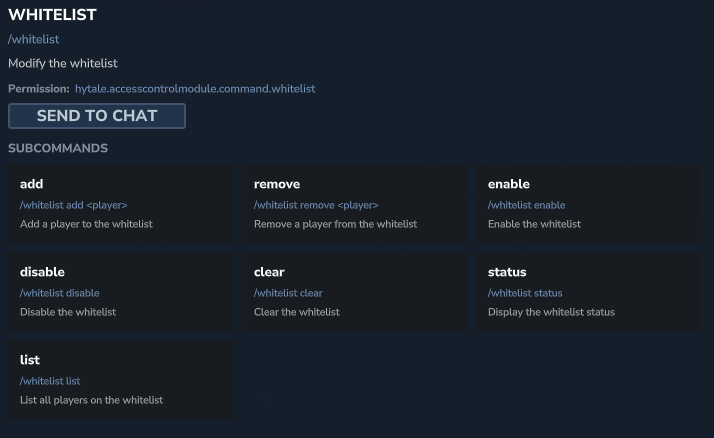
Here are the most common whitelist commands:
| Hytale Order | Description | Supported identifiers |
|---|---|---|
/whitelist add <joueur> | Adds a specified player to the whitelist. | Online username or offline UUID |
/whitelist remove <joueur> | Removes a specified player from the whitelist. | Online username or offline UUID |
/whitelist list | Displays all players currently registered on the whitelist. | N / A |
/whitelist enable | Enables the server’s whitelisting functionality. | N / A |
/whitelist disable | Disables the server’s whitelisting functionality. The server becomes public. | N / A |
Manually edit the file whitelist.json
Although the commands are convenient, you can also directly edit the file whitelist.json for bulk adjustments or to integrate the list into an external management system.
The file is a simple JSON array that lists the UUIDs of authorized players.
[
  "550e8400-e29b-41d4-a716-446655440000",
  "123e4567-e89b-12d3-a456-426614174000",
  "abcdef12-3456-7890-abcd-ef1234567890"
]
Precautions when editing manually:
- Always back up: Before making any changes, make a copy of your file
whitelist.json. - Server restart: Manual changes made to the file while the server is running may be overwritten. It is essential to restart your server after making
whitelist.jsonchanges for them to take effect.