
Today, we will look at a fundamental aspect of navigating the vast world of Orbis efficiently: teleportation. Whether you are a solitary explorer, a base builder, or a server administrator, understanding how to teleport can transform your gaming experience.
Hytale’s teleportation system is designed to facilitate fast travel, allowing you to save precious time and focus on the adventure. There are several approaches to teleporting, ranging from portals you build to powerful commands reserved for administrators.
The basics of teleportation
Hytale offers two main methods of teleportation: portals crafted or discovered in-game, and direct commands for players with privileges.
Hytale portals: instant travel
Portals are teleportation structures that allow instant movement from one place to another. They are essential for fast travel, base management, and multiplayer coordination. Hytale primarily distinguishes between two types of portals:
| Portal type | Description | Key characteristics | Common use cases |
| Natural gateways | Large ancient portal structures discovered during exploration. | • Pre-generated in the world • Often inactive upon discovery • Must be activated or repaired • Serve as major travel hubs | • Long-distance teleportation • Connecting important regions • Story-based exploration • Large-scale fast travel |
| Player-crafted portals | Small teleporters that you can craft and place yourself. | • Can be placed almost anywhere • Fully controlled by the player • Easy to move or link • Designed for personal networks | • Connecting main bases and outposts • Quick access to mines and farms • Flexible exploration points |
Crafting a teleporter in-game
To create your own teleporters, you will need to progress in the game to unlock the Arcanist’s Workbench.
- Upgrade your workbench: The teleporter is mid-game technology. You will first need to upgrade your basic workbench to Tier 2, which requires copper, iron, and linen scraps.
- Craft the Arcanist’s Workbench: Once your Tier 2 workbench is in place, you can craft the Arcanist’s Workbench. You will need Thorium, extra linen scraps, and Void Essence.
- The teleporter recipe: It is on the Arcanist’s Workbench that you will craft the teleporter itself. Each craft produces two units, which is perfect since teleporters work in pairs.
| Material | Quantity | Source |
| Azure kelp | 2 | Blue aquatic plants found in azure forest biomes and desert oases. |
| Azure logs | 8 | Blue-leaved trees in azure forest biomes. |
| Stone (any type) | 10 | Found everywhere in the world. |
Placing and linking your portals: Once crafted, place two teleporters at different locations. Interact with them to name them (a clear name is crucial for managing your network!) and link them. By entering one, you will be instantly transported to the other, with a unique visual and sound effect.
Teleportation commands: power at your fingertips
For server administrators, content creators, or players in creative mode, commands offer direct control over teleportation. The main command is /tp.
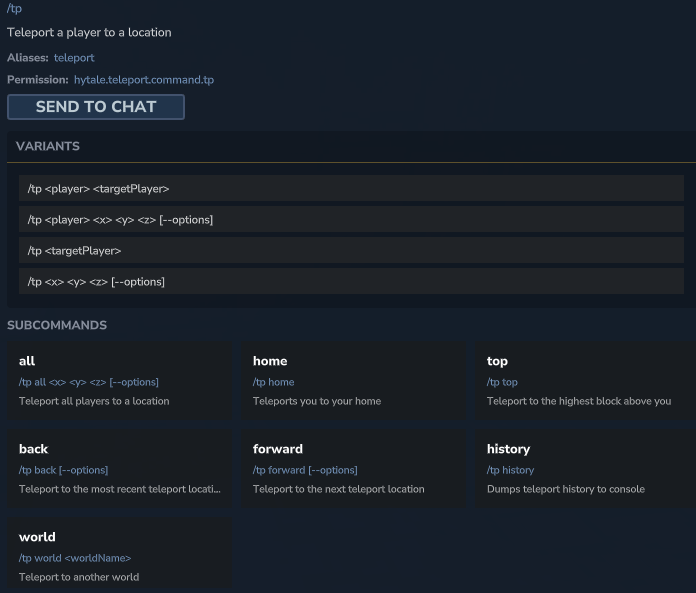
| Command | Description | Example usage |
/tp <player> | Teleports your character to another online player. | /tp john (teleports you to John) |
/tp <player1> <player2> | Teleports player 1 to player 2’s location. | /tp mary paul (teleports Mary to Paul) |
/tp <x> <y> <z> | Teleports your character to specific coordinates in the world. | /tp 100 64 -250 |
/tp <x> <y> <z> <world> | Teleports your character to coordinates in a specific world. | /tp 50 70 500 creative_world |
/spawn | Brings you back to the world spawn point. Useful for quickly returning to base. | /spawn |
/warp <location_name> | Teleports to a location saved via a teleport beacon or waypoint. | /warp my_main_mine |
/tp all | Teleports all connected players to your position. | /tp all (useful for admin events) |
Note: Coordinates can use relative notation with ~. For example, /tp ~ ~10 ~ teleports you 10 blocks above your current position.
Mastering the teleportation system
A single teleporter is useful, but true power lies in building an efficient portal network.
Unlocking more teleporters
At the start, you are limited to a small number of active teleporters. To increase this limit, you must activate the Memories system at the Forgotten Temple.
- Find the Forgotten Temple: The Forgotten Temple is marked on your map from the beginning of the game by a special icon (similar to a teleporter). It is a priority destination.
- Activate the memory system: Once at the Forgotten Temple, interact with the Heart of Orbis, a glowing statue in the center. This unlocks the ability to collect “Memories” by meeting new creatures and NPCs.
- Restore memories: By restoring these memories at the Forgotten Temple, you unlock rewards, including an increase in the maximum number of teleporters you can place.
| Memories collected | Max active teleporters | Network potential |
| 0 | 2 | Simple point-to-point travel |
| 25 | 3 | Triangular network formation |
| 50 | 4 | Regional hub connections |
| 100 | 6 | Complete coverage of major zones |
| 200 | 8 | Maximum density for optimal exploration and management |
Managing your teleportation history
The /tp command system includes practical options to navigate your teleportation history:
| Command | Description | Key parameter |
/tp back [--count] | Returns to the previous teleport location. | count: number of locations to go back (default 1) |
/tp forward [--count] | Advances to the next teleport location in history. | count: number of locations to go forward (default 1) |
/tp history | Displays your full teleportation history in the console. | None |
These commands are valuable allies for exploration, allowing you to quickly retrace your steps or revisit important places without having to memorize complex coordinates.
Tips for an efficient teleportation network
- Centralized hub: Place a main portal at your primary base to serve as a connection point to all other destinations.
- Resource points: Install portals near mines, forests, farms, or rare biomes for quick access to materials.
- Exploration points: Use them near dungeons, ruins, or hard-to-reach areas to facilitate returns and continued exploration.
- Multiplayer coordination: On a server, link team bases to improve cooperation and rapid response to threats.