
Time management is a fundamental aspect for any server administrator or content creator in Hytale. Whether you want to freeze the sun at the zenith to facilitate a complex build, create an eerie atmosphere for an event, or simply speed up crop growth, manipulating time is essential.
The in-game time cycle influences not only aesthetics via the dynamic lighting system but also gameplay, notably the spawning of specific creatures during the night or NPC behavior depending on the time of day.
The /time Command
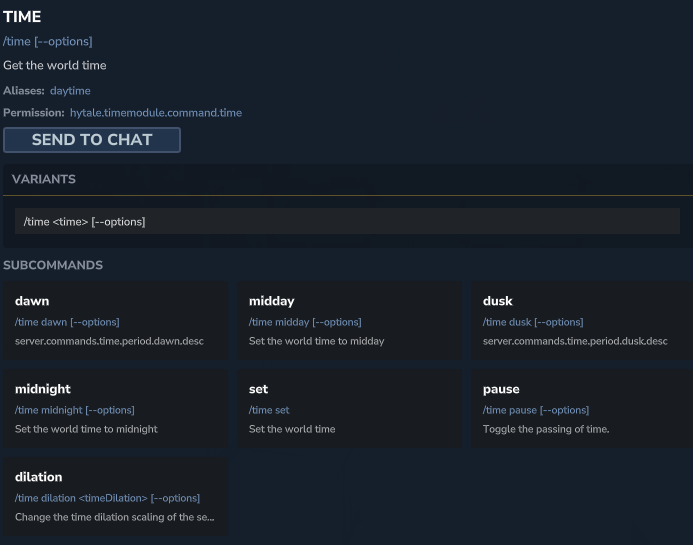
This command is the main tool for manipulating World time. It allows administrators to set a specific time, accelerate the passing of the day, or query the exact age of the world in game ticks.
It is indispensable for controlling the atmosphere or testing light-dependent mechanics, such as Night light for nocturnal spawns.

📋 Technical Sheet
- Description: Allows modifying, adding, or querying the time elapsed in the current world.
- Permission:
hytale.command.time
🛠️ Syntax and Usage
| Action | Syntax | Description | Example |
| Set Time | /time set <value> | Sets the time to a specific hour. Accepts numbers (ticks) or standard aliases. | /time set day |
| Add Time | /time add <number> | Advances the current time by a specific amount of ticks without resetting the day. | /time add 5000 |
| Query Time | /time query <type> | Displays the current time (daytime) or the total elapsed time (gametime). | /time query daytime |
| Key Moments | /time <dawn|midday|dusk|midnight> | Shortcuts to immediately set the world to dawn, midday, dusk, or midnight. | /time dusk |
| Pause | /time pause | Toggles the natural flow of time on or off. Freezes the day/night cycle. | /time pause |
| Dilation (Speed) | /time dilation <value> | Modifies the time dilation scale (speeds up or slows down the passage of time relative to reality). | /time dilation 2.0 |